Blog · Seqora vs
Seqora vs TablePlus
A TablePlus alternative for PostgreSQL, MySQL, MariaDB and SQLite on Windows and macOS, compared with TablePlus 27.2: twenty engines against four read in depth, the price over three years, what happens when you press save, what you get for a slow query, and when TablePlus is still the right call.
 Ayushman ·
20 min read
Checked against Seqora 0.5.2 and TablePlus 27.2.0 (412) on Windows 11 on .
I built Seqora, and this is my comparison of it with TablePlus. I checked TablePlus 27.2.0 and Seqora 0.5.2 on Windows 11 on 4 November 2026, against one SQLite file. For what I could not run, I used TablePlus's docs and changelogs. If you use TablePlus on a Mac, it has more than I describe here. If you need Redis, MongoDB, Oracle, Snowflake or Linux, the short answer is TablePlus, and the ledger is all you need from this page.
What happens when you press save
I installed TablePlus on this PC, connected it to a small SQLite file, double-clicked the status of order 1001 and typed shipped. The cell turned orange, and so did the table's name in the sidebar. I pressed CtrlS. The row was updated. Nothing asked me to confirm it. That is the default, and TablePlus calls it Silent Mode.
In Seqora the same file opens locked by default, and the grid says Unlock the connection to change rows. Unlocked, the same edit waits in a Pending changes bar until you apply it. Applying opens a review with the UPDATE under Visual diff and SQL script, and runs it in one transaction.
Neither of those is wrong. TablePlus makes you opt each connection into caution, with a colour, a tag and a lock mode you set on it. Seqora makes you opt each connection out. The difference runs through both apps. TablePlus is a fast window onto twenty databases, and it gives each of them the same grid and the same editor. Seqora takes four databases and reads them. Every table, index, sequence, function and view gets a page. Every slow query gets a drawn plan. Every schema gets a diagram you can change, and every grid edit gets a review.
The ledger
| TablePlus | Seqora | |
|---|---|---|
| Engines | 20 on Windows, 23 in the docs, from PostgreSQL to Cloudflare D1 | PostgreSQL, MySQL, MariaDB and SQLite, each read in depth, SQL Server next |
| Platforms | macOS, Windows, Linux, iOS | Windows, macOS on Apple silicon |
| Price | $99 once per device with a year of updates, $59 to renew | Free with no caps, or Pro at $99 a year with every update |
| Unlicensed | A free version capped at 2 or 3 tabs and 2 windows, no advanced filters on Windows | Free, no tab or window caps, no account, fine for paid work |
| Writes | Edits pending until CtrlS, preview on CtrlShiftP | Locked by default, grid edits and high-risk SQL reviewed first |
| Production | A colour, a tag and the lock mode you set on the connection | Read from the environment name, stricter rules follow |
| EXPLAIN | The plan as rows in a grid | Pro: row flow, time strip, findings, an index test |
| Schema diagram | One schema with foreign keys, edits pending until CtrlS per the docs | Read view and export (Free), design with checks and a dry run (Pro) |
| Objects | Structure editor, indexes, triggers, DDL | A page per index, sequence, function and view (Pro) |
| Schema history | None | Every change recorded, what made it, undo scripts and a drift board (Pro) |
| Index advice | None | Duplicate, unused and redundant indexes (Free), ranked adds and drops (Pro) |
| First look at a database | The sidebar | A database brief: areas, tables to read first, joins without keys, smells |
| Import | CSV, JSON and SQL dumps | CSV, TSV and Excel, every row checked, upsert, undo (Pro) |
| Backup and restore | Bundled pg_dump and mysqldump, now legacy, and a Sync database with schedules |
None, you run pg_dump yourself |
| AI in the app | Assistant tab, nine providers, your own key or account | None, agents connect through MCP instead |
| Agents (MCP) | Off by default, tokens by scope, approval for unsafe queries | Off per connection, read-only, briefs and index checks, proposals you apply (Pro, PostgreSQL) |
| Plugins | JavaScript plugins, in beta | None, only custom commands in YAML |
| Crash reports | On by default, a licence to turn them off | Off until you say yes |
The glyphs are mine. A filled dot marks a side I would pick, a ring a side I would not, and a dash a side that does its job. If a row matters more to you than it does to me, its section below has the detail.
Twenty engines against four
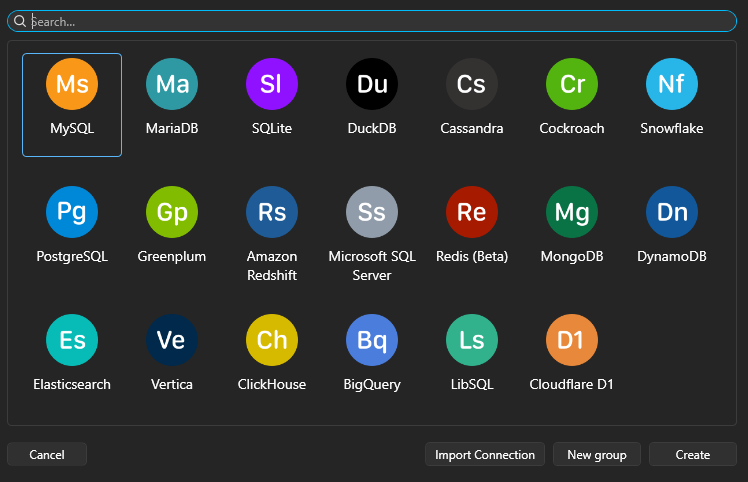
TablePlus's new connection picker on Windows lists MySQL, MariaDB, SQLite, DuckDB, Cassandra, Cockroach, Snowflake, PostgreSQL, Greenplum, Amazon Redshift, Microsoft SQL Server, Redis (marked Beta), MongoDB, DynamoDB, Elasticsearch, Vertica, ClickHouse, BigQuery, LibSQL and Cloudflare D1. The docs list three more: SingleStore, Turso, and Oracle on the Mac only. TablePlus runs on macOS, Windows and Linux, and there is an iOS app that a desktop licence unlocks.
Seqora 0.5.2 connects to PostgreSQL, MySQL, MariaDB and SQLite, and SQL Server is in the code for a coming release. Four is the number because of what each one gets. The Plan tab (Pro) draws PostgreSQL, MySQL and MariaDB plans. The ER diagram, the database brief and schema history work on all four, and so do the Pro tools: object pages, schema design, compare, drift and import. The parts an engine cannot answer are left out rather than faked, so SQLite has no functions page and MariaDB has no column histograms. The breadth of a twenty-engine client comes from treating every engine alike. The depth of a four-engine client comes from asking each one everything it knows. It runs on Windows and on Apple silicon Macs. There is no Linux build and no Intel Mac build.
What you pay over three years
TablePlus sells a perpetual licence per device. Basic is $99 for one device, Standard is $129 for two, and a team seat is $79 with three seats minimum. Each comes with a year of updates. After the year the app keeps working on the last build your licence covered, for as long as you like. Another year of updates is $59 per device. Nothing renews on its own. Students and teachers get half off by email. Refunds are open for seven days. One licence covers all three desktop platforms and the iOS app, and Mac users can also get it through Setapp.
The price has moved. One device was $59 until August 2021, $69 that September, $79 in early 2022, $89 in 2023 and $99 by December 2024. Renewal went $39, $49, $59, and a team seat $49, $59, $79, with the last step of each in late 2025. I read them off archived copies of the pricing page. Pay once is what people like most about TablePlus, and it is a little less once than it was: a licence bought in late 2024 and never renewed stopped before the native diagram and the MCP server, which both arrived in June 2026.
Unlicensed, TablePlus is a free version without a clock. The docs say 2 open tabs, 2 windows, 2 filters at a time, 1 metrics board, and no turning off crash reports. On this PC the fourth table tab was refused with Free Trial limits 2 Opened Workspaces. Do you want to buy a license to unlock it? The advanced filter is not in the free Windows build.
Seqora Free has no tab or window caps and needs no account. The pricing FAQ says Free is fine at any company and for paid client work. Free covers the editor, the grid with staged edits and review, the ER diagram, charts, exports, object lists with DDL, the database brief, index health, seven days of schema history and the MCP server. Pro is $99 a year or $9.99 a month, with a 14-day trial that takes a card, on up to three of your own computers. Pro adds the Plan tab, schema design, schema compare and drift, object pages, import, full-result export, the index advisor's ranking, agent proposals, schema history beyond seven days and the brief's fix scripts. When Pro ends, the app goes back to Free and deletes nothing. Free and Pro get the same updates.
| Three years, one computer | TablePlus | Seqora |
|---|---|---|
| Query, browse, edit, export, diagram | $99, and after a year you keep the last build | $0 |
| Updated every year | $99, then $59 and $59, which is $217 | $0 |
| With the reading tools | Not sold at any price | $297, or $147 if started on or before 31 December 2026 |
| A second computer | $129 for two, then $59 each to renew | The same key, up to three |
The comparison that matters is between TablePlus's licence and Seqora Free, because Free already covers what most people do in TablePlus all day: connect, browse, query, edit with a review, export, draw the schema. Pro is for the reading tools, which TablePlus does not have at any price.
How an edit reaches the server
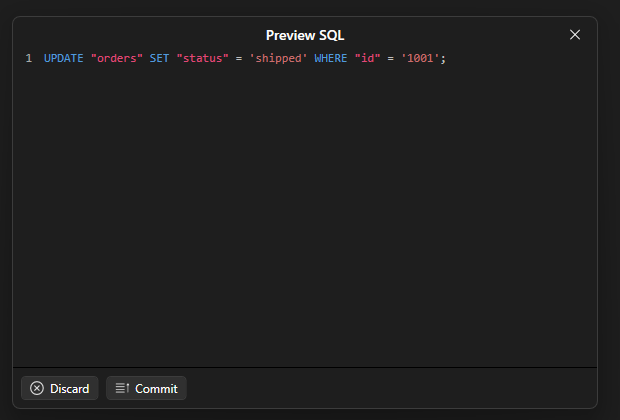
In TablePlus the orange cell waits until CtrlS sends it. CtrlShiftP opens Preview SQL, a window with the statement and two buttons, Discard and Commit, and you can take the SQL into an editor from there. CtrlS does not open it. SQL you type in the editor runs as typed, with no preview at all.
In Settings › Security, Default Safe Mode for new connection is Silent Mode. Above it are two Alert modes. One confirms every query, the other every query except SELECT, EXPLAIN and SHOW. The two Safe modes ask for the database's password instead, and on a Mac, Touch ID can answer for it. The lock icon in the toolbar sets the mode per connection.
In Seqora every new connection opens locked by default. A locked connection runs only SQL that Seqora can prove is a read, and the grid will not take an edit. A timer can lock it again after you unlock it. Edits wait in a list and apply together. For order 1001, Visual diff shows one row tagged UPDATE, status before and after, and SQL script shows the statement under Atomic transaction script for this change set. Every UPDATE and DELETE checks that the row still holds the values you loaded, so an edit made on stale rows fails instead of overwriting someone else's change.
The data grid with one staged edit, and the review that applies it.
The editor has the same posture. DELETE without a WHERE, DROP, TRUNCATE, ALTER, GRANT, UPDATE without a WHERE and anything the parser cannot classify stop for a high-risk review before running. On a connection whose environment is called prod or production, the apply button turns red and needs CtrlEnter. A schema change asks you to type the database's name. High-risk SQL asks for the connection's name. There is no checkbox for production. The word in the environment name is enough.
TablePlus's model is the one most clients use, and the Alert and Safe modes are there for the connections that deserve them. Seqora's model costs a click on every edit, from the first minute, and in return it has never let me write to the wrong database.
What you get for a slow query
In TablePlus you write EXPLAIN yourself and read the result as a grid. On the SQLite file, EXPLAIN QUERY PLAN came back as two rows with id, parent, notused and detail columns, in 141 ms. No plan view is documented, and the request for one, issue 3377 on their tracker, has been open since August 2024. The way a PostgreSQL user reads a plan in TablePlus is to run EXPLAIN (ANALYZE, FORMAT JSON), copy the cell, and paste it into explain.dalibo.com or depesz. If you can read plans, that works.
Seqora's Plan tab is Pro. Run a statement and click Plan. Seqora asks for estimates first. For a read, it then runs EXPLAIN ANALYZE inside a transaction it rolls back. The plan never leaves the machine. It is drawn as row flow, left to right, each band as wide as the rows that left the node. A band whose estimate was wrong is drawn dashed where the error starts. A time strip splits the milliseconds by node. On the Guide's 12-million-row copy of the commerce sample, the findings under the canvas say that Seq Scan on orders read 12,000,000 rows and kept 206,880. The planner expected 612 of them, off by 338×, so every join above it was planned for 612 rows. Click the scan and the inspector lists the table's indexes and why none of them led with channel. Test index plans the statement again with a hypothetical index, through hypopg, without building it.
The same slow report as the SQL editor prints it and as the Plan tab draws it.
Why is this query slow? reads that plan from the top. The tab does the arithmetic I used to do by hand, rows times loops, this node minus its children. It puts the answer where my eye already was.
MySQL from 8.0.18 and MariaDB get the tab for reads, without the hypothetical index. SQLite gets estimates only, with no timings and no findings. The index advisor sits beside the tab on every engine but SQLite. Duplicate, redundant and unused indexes are listed for free. On PostgreSQL, Pro ranks the adds and drops by the workload time they would save, and on MySQL and MariaDB it lists the workload and the drops.
A schema you did not write
TablePlus has Tools › Show diagram. It opens a window with every table of one schema as a card, columns and types listed, foreign keys drawn as arrows, with search, zoom and a grid toggle. For years this was a plugin. Since June 2026 it is native on the Mac, and the docs say it edits: rename a table, change a column, drag a foreign key, and the change is pending until ⌘S like any other. On Windows I found a read view and could not find a way to write a change from it. The Structure tab on a table is where TablePlus has always been strong: columns, types, nullability, defaults and foreign keys in an editable grid, with Columns, Triggers and DDL under it.
Seqora's ER diagram is Free on every engine and draws crow's-foot cardinality. The inspector for each table lists its relationships with their delete rules, the row estimate and the index coverage. It exports as PNG, SVG or Mermaid. The first time you connect, a Database brief opens: the areas of the schema by foreign-key cluster, the tables to read first, joins with no foreign key behind them, and the smells. The brief is Free too, and it exports as Markdown for a pull request or as context for an agent.
The rest of this section is Pro, on all four engines. Each index, sequence, function and view gets a page: what an index is used for and what queries it can answer, how much runway a sequence has left, who can run a function and as whom, whether a materialized view is stale. The diagram becomes a drawing surface. Add a table or drag a foreign key, and a SQL pane writes the change with risk tags like Rewrites table and Blocks writes. Applying it runs checks against your data and a dry run first, takes a snapshot, then runs one transaction on PostgreSQL and SQLite. On production you type the database's name. Schema compare does the same between a database and another connection, a saved design or a snapshot. Schema history records the changes it sees in the schemas you open, says whether Seqora, a migration or something outside made each one, and writes the undo script (Pro). The last seven days are Free. A drift board (Pro) compares dev, staging and production from snapshots, without querying production.
The ER diagram in design mode, with a change drawn and its SQL beside it.
Both apps let you draw a change. In TablePlus the drawing is pending SQL. In Seqora it goes through checks and a dry run first, lands in the history with an undo script, and shows up on the drift board if production does not get it.
What an agent is allowed to do
Both apps ship an MCP server now. TablePlus has had one on the Mac since June 2026. It is off by default in Settings › MCP and listens on port 51003. Tokens are scoped to Read Only, Read & Write or Full Access, and to chosen connections. Approval needed for unsafe query is on by default, there is an activity log, and Claude Code, Codex and others get one-click setup rows. Its tools list connections and run queries.
Seqora's runs over stdio from the app binary and installs into Claude Desktop, Claude Code, Cursor, VS Code and Codex from Settings. Agent access is off for each connection until you turn it on. Its run_query tool refuses anything that is not a read. The other tools are the app's own reading: the schema, an object's page, the database brief and the schema history. check_index tells an agent whether an index would help before anyone builds it. On Pro an agent can rank indexes and propose a PostgreSQL schema change, and you review, exclude and apply it. The agent never applies.
Inside the app they split. TablePlus has an Assistant tab in the right sidebar, on by default, where you type Ask anything.... The model comes from OpenAI, Anthropic, Google, OpenRouter, DeepSeek, GitHub Copilot, Codex CLI, Claude CLI or Ollama, with your own key or account. Its docs say your messages, the CREATE statements you add as context, connection metadata and query results with their rows go straight to the provider you chose. None of it passes through TablePlus. Seqora has no chat in the app. The agent you already use gets the same tools instead, and nothing leaves the machine unless you ask it to.
Where the data goes
TablePlus keeps connections on your machine, with passwords in the Keychain on a Mac and on each PC on Windows. You can point a connection folder at a drive you share with your team, and passwords stay out of it. Queries and history can live on a cloud drive to sync. Crash reports are on by default, and the docs say a licence is needed to turn them off. The licence check uses a one-way hash of the device.
Seqora has no account and no sync. Connections, passwords and designs live in a local SQLite database encrypted with SQLCipher, keyed from the Windows Credential Manager or the macOS keychain. Free never contacts a licence server. Pro checks its key and works 30 days offline between checks. In 0.5.2 the app counts which features you use, on this computer, behind a one-time notice, and sends nothing. The next release sends one anonymous report a day with those counts in buckets, on unless you turn it off. It carries no identifier, queries or names, and Settings › Privacy shows the exact report. Crash reports are off until you say yes.
What TablePlus does better
- Twenty engines on Windows and twenty-three in the docs, with Linux and iOS on top. Seqora has four engines and two platforms.
- Backup and restore. TablePlus bundles
pg_dumpandpg_restorefor PostgreSQL 11 through 18 andmysqldumpfor 5.7 and 8.0, now marked legacy beside the newSync databaseand its schedules. In Seqora you runpg_dumpyourself. - The structure editor, a process list, user management and a metrics board of SQL-driven charts. Seqora edits structure on the diagram (Pro) and has no process list, user management or metrics board.
- Plugins, in JavaScript, in beta, with a manager and an install from file.
- The Assistant, if you want a chat in the client.
- Vim mode, in beta on the Mac.
- A connection folder a team can share, with passwords left on each machine.
- A licence you pay for once.
What Seqora does that TablePlus does not
- Reviews every grid edit and every high-risk statement: staged changes, a visual diff, one transaction, and a recheck that the rows are still what you loaded.
- Knows which connection is production from its environment name, and changes what it asks for.
- Draws the plan. Row flow, the time by node, findings with the fix attached, and an index you can test before you build it (Pro).
- Opens with a database brief, and exports it for a pull request or an agent.
- Reads objects. A page per index, sequence, function and view, with usage, runway, security and freshness (Pro).
- Records schema history on every connection, says what made each change, and adds undo scripts and a drift board across environments (Pro).
- Checks index health for free, and ranks adds and drops by workload on Pro.
- Designs schema changes on the diagram and applies them after checks and a dry run (Pro).
- Compares two schemas, a design or a snapshot, with the data checked before the change (Pro).
- Imports with every row checked, upsert, rejects you can fix, and an undo (Pro).
- Exports Parquet, JSONL and Markdown, and streams a full result past the row cap (Pro).
- Gives agents the same reading tools, read-only by default, and lets them propose changes you apply (Pro, PostgreSQL).
- Imports your TablePlus connections, along with DBeaver, DataGrip,
.pgpassand.my.cnf.
Don't pick Seqora if
- You need an engine it does not have.
- You work on Linux or an Intel Mac.
- Your SSH route needs
ProxyJumporProxyCommand, or you connect over a Unix socket. Seqora speaks SSH itself, one hop only. - You edit tables that have no primary key. Seqora will not edit those rows in the grid.
- You want a one-time purchase.
- You want a chat inside the client, or Vim keys.
- You restore dumps from the GUI.
- A review before every edit would annoy you more than a bad write would.
I would rather you keep TablePlus than find one of these on day two.
When Seqora is the better fit
- Your databases are PostgreSQL, MySQL, MariaDB or SQLite, and you want to understand them, not only query them. The brief, the diagram and the history are Free, the plan and the object pages are Pro, and TablePlus has nothing like any of them.
- You have production credentials in your client and would like the client to know that. Seqora opens every connection locked and reads
prodin the environment name. - You inherited a schema. The brief tells you which tables to read first, and the diagram and the object pages fill in the rest.
- You want a free version without a tab or filter cap, and a paid one that ends at a date rather than at a build.
Caveats
- I checked TablePlus on Windows only. The macOS build has been around longer and has more in it. Where this page says TablePlus lacks something, check the Mac before you believe me.
- I did not run TablePlus against PostgreSQL on this PC, so the
EXPLAINrow rests on the SQLite run, the docs and the open issue. - Seqora 0.5.2 is the release this page was checked against. The Windows installer is not code-signed yet, so the install script on the download page is the quick route past SmartScreen.
- Prices are what the two sites printed on 4 November 2026. Both will change.
- What is Pro in Seqora is listed under the price above. Everything else on this page is Free.
Questions
Is TablePlus free?
There is a free version with no time limit and hard caps. The docs say 2 open tabs, 2 windows, 2 filters and 1 metrics board, and no advanced filters on Windows. A licence is $99 for one device with a year of updates, and $59 a year after that if you want to keep updating.
Does TablePlus work on Windows?
Yes. TablePlus 27.2.0 for Windows is a .NET application with twenty engines, and since this version it has an ARM64 build. It is younger than the Mac build. Oracle has not reached it, and Vim mode appears not to have either.
Is Seqora a TablePlus alternative for Windows?
For PostgreSQL, MySQL, MariaDB and SQLite, yes. For any other engine, no. Seqora runs on Windows and on Apple silicon Macs, and the Free plan has no tab or window caps.
Is Seqora only for PostgreSQL?
No. MySQL, MariaDB and SQLite get the same editor, grid, review, diagram, brief, history, design and compare. The Plan tab draws MySQL and MariaDB plans too. PostgreSQL gets the most because it answers the most questions. Types and extensions pages, the hypothetical index test and agent proposals are PostgreSQL only today.
Can I import my TablePlus connections into Seqora?
Yes, from the connection dialog's import, which also reads DBeaver, DataGrip, .pgpass and .my.cnf. The connection details come across. Passwords do not, because Seqora does not read TablePlus's stored passwords, so you enter them once. Saved queries, favourites and history do not come across. Every import starts offline and locked.
Does Seqora have a lifetime licence?
No. Free is free for as long as you like. Pro is $99 a year or $9.99 a month, or $49 a year or $5.99 a month for subscriptions started on or before 31 December 2026 and renewed without a break. When Pro ends the app goes back to Free with nothing deleted.
Is Seqora open source?
No. The source is closed. It is one person's product, and every email to the support address lands with me.
Which is better for PostgreSQL?
If you read plans and schemas, Seqora, because that is what it draws. If you need backup and restore from the GUI, or work across many engines, TablePlus.